team
PM, 5 Devs
Platform
Enterprise B2B
TL;DR
Background
Pipeline Simulator lets users test data pipelines with sample data before deploying them.
Problem
Users could complete simulations, but struggled to explain what happened, where results appeared, or why outcomes occurred.
ApProach
Conducted peer reviews, mapped workflows, facilitated workshops, and redesigned the simulator experience.
outcome
Introduced Edit and Simulate modes, one step re-runs, clearer result locations, and formatted output views.
Impact
BEFORE: A migration project, on a simulator users could run but not explain.
AFTER: A usability initiative that made simulation state, results, and outcomes visible, backed by evidence the team aligned on.
01 CONTEXT
Understanding Ironstream
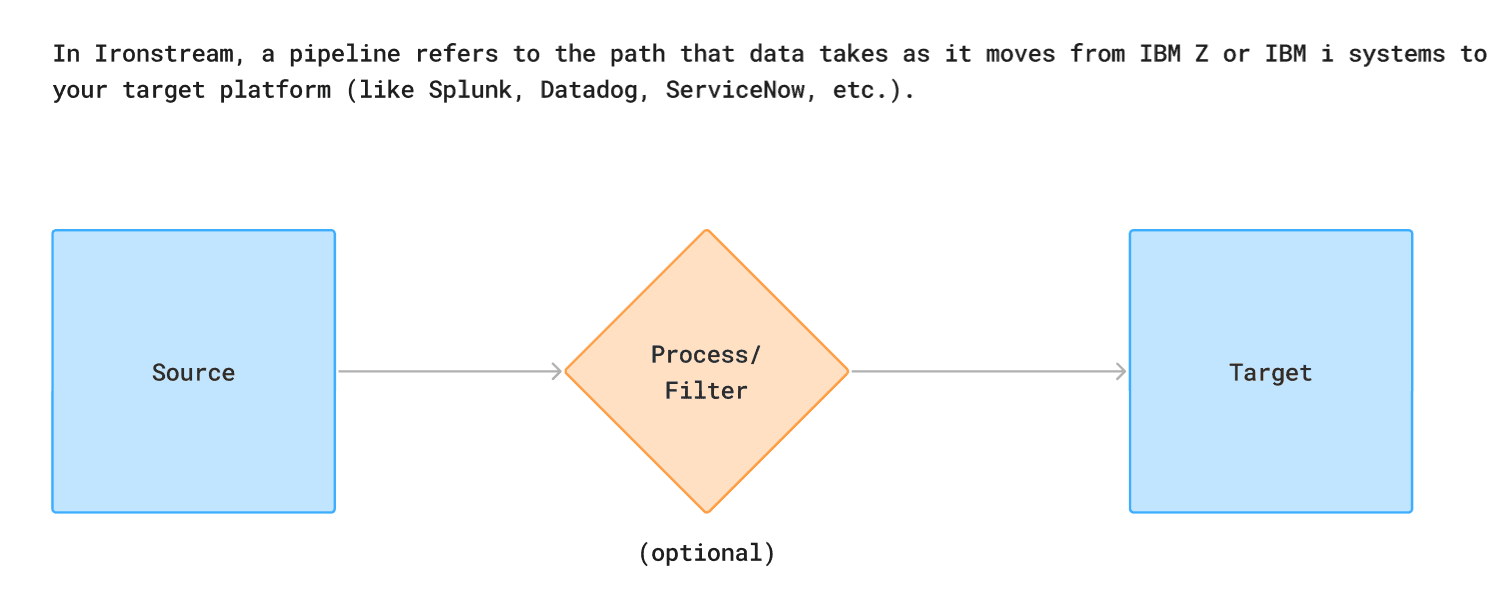
Ironstream is an enterprise data integration platform that helps organizations collect, transform, and route operational data from IBM i and IBM z environments to modern monitoring, analytics, and security platforms.
Its users include system administrators, operations teams, and engineers who rely on accurate data movement to monitor systems, investigate issues, and support business-critical workflows.

What is Pipeline Simulator?
Before deploying a pipeline, users need confidence that their configuration will behave as expected.
Pipeline Simulator allows users to test a pipeline using sample data and inspect how information changes as it moves through different stages of the workflow. Instead of waiting for a live execution, users can validate configurations, understand transformations, and identify issues earlier in the process.
Why It Matters
Enterprise pipelines often contain multiple transformations, dependencies, and processing steps.
When users cannot clearly see how data is moving through a workflow, validating configurations becomes harder and troubleshooting takes longer. The simulator was designed to provide that visibility.
As I started reviewing the experience, however, I realized that understanding the simulator itself was becoming part of the challenge.
02 PROBLEM
A Feature Everyone Thought Worked
One of the first things I did after joining the product was review existing workflows to understand how users completed their tasks.
The Pipeline Simulator immediately stood out.


Before
At first glance, the feature seemed powerful. It allowed users to validate pipelines, inspect transformations, and troubleshoot issues before execution. But as I spent more time with it, I found myself asking teammates to explain what I was looking at before I could confidently use it.
That raised an important question:
If someone working closely with the product needed help understanding the simulator, how easily could users understand it on their own?

The review highlighted several issues.
• Important information was spread across different areas of the interface.
• Simulation results felt disconnected from the workflow that generated them
• Understanding what was happening often required prior product knowledge.
At this point, it would have been easy to jump straight into redesigning the experience.
But there was another challenge.
Proving the Problem Existed
Nobody considered the simulator broken. Users could complete their tasks, and the team's focus was migrating the experience to Ironstream's new design system. There was little reason to question the workflow itself, and that was fair.
This wasn't a usability issue that stopped people. Users reached the end of the workflow; they just didn't always understand how they got there.
So before redesigning anything, I had to prove that the confusion I was seeing was a recurring pattern, not an isolated opinion.
03 DISCOVERY
Looking for Evidence
I wanted to understand how well users actually understood the experience.
Rather than relying solely on my own observations, I conducted peer review sessions with 6 participants and asked them to complete realistic simulation tasks using the existing workflow.

What We Learned
Reviewing the peer review findings revealed that the challenges weren't isolated to a single interaction.
While users could successfully run simulations, many struggled to understand what was happening between the input and the result.
What is happening?
Where is it happening?
Tracking data through the workflow and identifying key transformations required significant effort and investigation.
Why did it happen?
Users couldn't view simulation outputs, and struggled to connect outcomes back to the steps that produced them.
Together, these findings revealed a larger issue. The simulator successfully executed complex workflows, but users often couldn't explain what happened between the input and the result.
The system understood the journey. Users didn't.
04 STRATEGY
Building Alignment
The findings pointed to an opportunity bigger than the planned migration, but the team still saw the simulator as working.
I shared the findings with PM, engineering lead, other stakeholders and walked them through the recurring points of confusion across participants.
The conversation gradually shifted from:
"Is this a real usability problem, or just a learning curve?"
"Which parts of the workflow need the most attention?"
Finding Where to Focus
With alignment established, the next step was identifying where improvements would have the greatest impact.
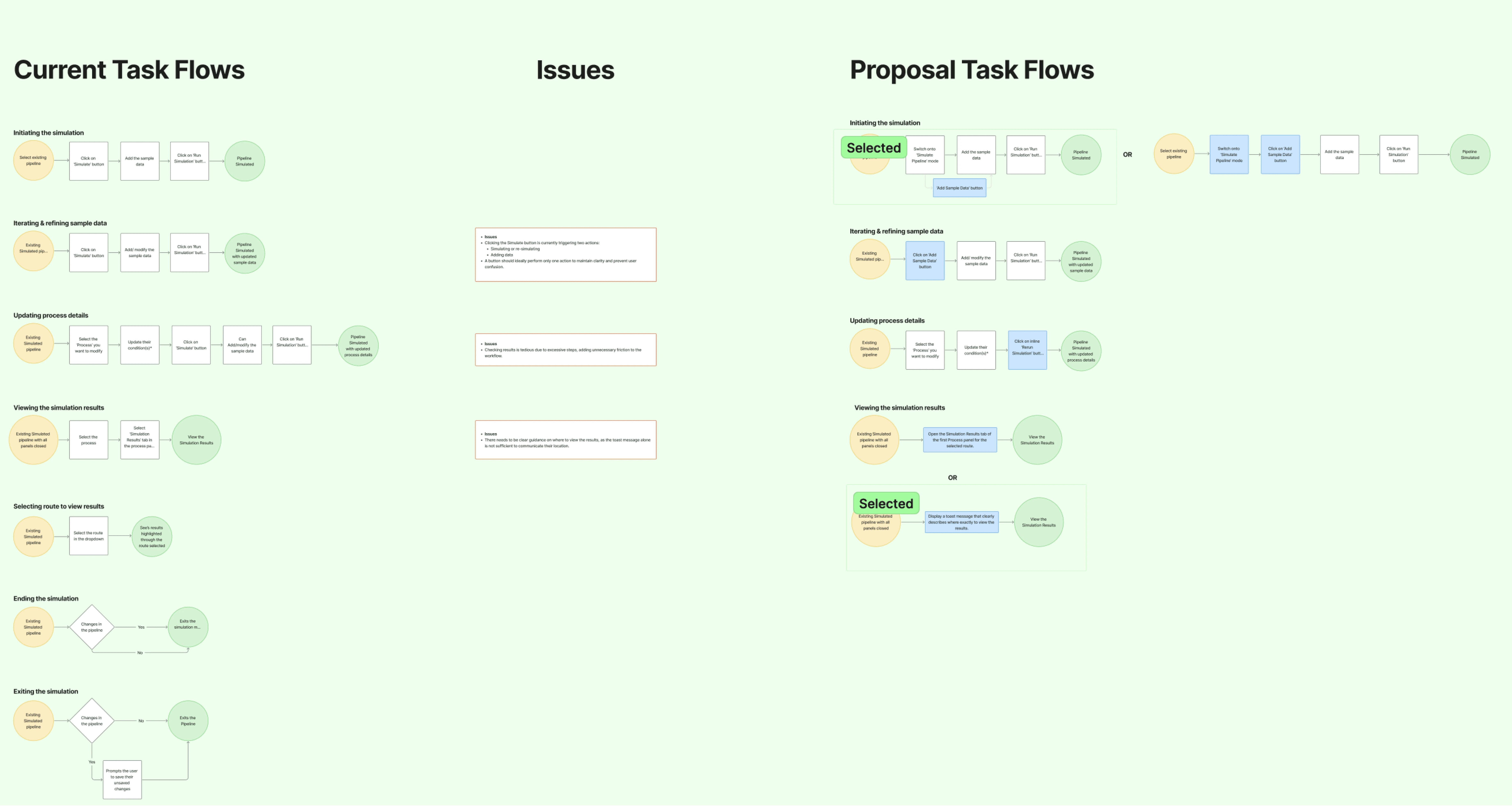
Rather than redesigning the entire experience, I broke the simulator into key task flows and reviewed where users were losing context, struggling to interpret results, or relying on trial and error.
This helped focus the redesign on the areas that contributed most to the comprehension gap.
Working Through Constraints
The project was still scoped as a design system migration, and timelines were tight. A full redesign wasn't on the table, and it didn't need to be. The simulator's core workflow worked; the gaps were in how clearly it communicated what was happening.
I worked closely with engineering to validate potential solutions and understand implementation constraints. These discussions helped us focus on improving transparency and clarity within the existing workflow while remaining practical to implement.

What We Learned
The research consistently pointed to a single challenge:
Users could run simulations, but they couldn't always explain what happened during them. To address this, every design decision was guided by three principles.
See What's Happening
Help users understand what simulator is doing & what they should learn from the results.
Follow Where It's Happening
Help users follow data movement and identify where transformations occur.
Connect Why It Happened
Help users connect simulation outputs back to the process that generated them.
05 SOLUTION
Making Simulation State and Results Visible
Discovery revealed that users often struggled to understand where they were in the simulation workflow — and once it completed, where to find the results.
The interface gave little indication of whether users were editing or actively validating a pipeline, and a successful run came with no clear path to the output.
Before


After
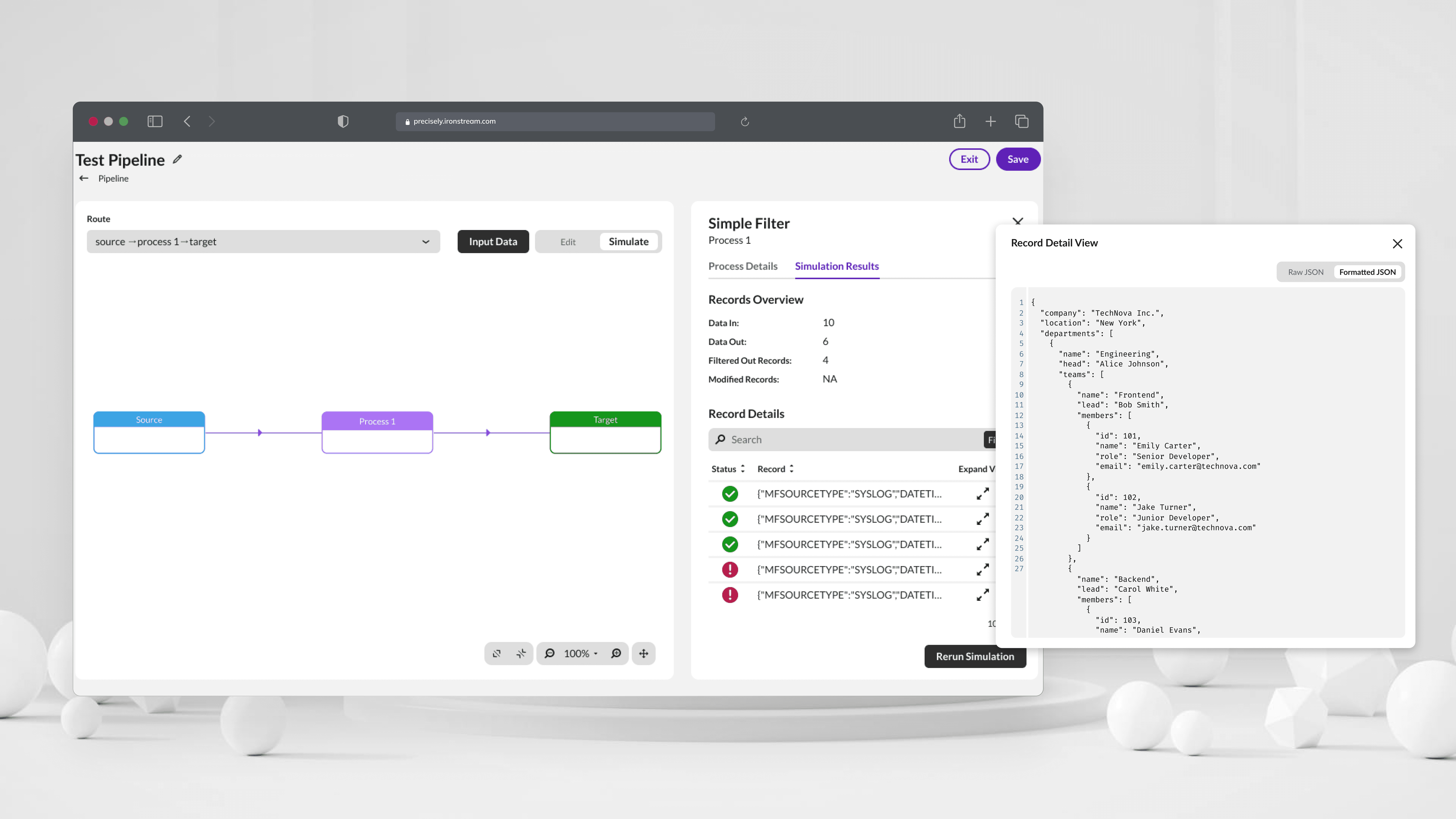
To address this, the experience introduced dedicated Edit and Simulate modes — surfacing input data, route visibility, and simulation status, with results connected directly to the step that produced them.
Making simulation a distinct, visible state helped users understand where they were, what to do next, and where to find their results.
Supporting Faster Validation Cycles
Research also showed that simulation was rarely a one-time activity.
Users frequently modified process configurations, reviewed the outcome, and needed to run the simulation again. Previously, this required reopening the simulation flow and repeating steps even when the input data remained unchanged.

To support faster iteration, a dedicated Re-run Simulation action was added directly within the Process Panel.
Users could quickly validate configuration changes using existing input data, while still having the flexibility to update inputs whenever needed — collapsing the loop to two steps: modify the config, then Rerun.
⚡ 4 steps → 2 steps per iteration — a ~50% reduction in the core validation cycle.
This reduced repetitive actions and made testing workflows more efficient.
Making Large Outputs Easier to Inspect
Once users located simulation results, another challenge remained.
Large JSON outputs were difficult to read and investigate. While the data was available, the existing view made it hard to scan complex payloads and identify relevant information.

To improve inspection, the final solution introduced both Raw and Formatted views.
Users could access the original payload when needed, while also switching to a structured format that was easier to read and analyze. This made large outputs significantly easier to inspect without altering the underlying data.
Bringing Everything Together
The redesign focused on improving visibility throughout the simulation experience rather than changing the underlying workflow.


Users could now understand when they were simulating, quickly rerun validations, know where results appeared, and inspect complex outputs more effectively.
By making existing system behavior easier to see and understand, the experience reduced confusion and helped users build a clearer mental model of how the simulator worked.
06 OUTCOME
The Impact Beyond the Interface
What began as a design system migration evolved into a broader usability initiative. Through research, workflow analysis, and cross-functional collaboration, the project uncovered deeper challenges affecting how users understood and validated simulations.
The resulting improvements focused on increasing visibility throughout the simulation journey, making outcomes easier to find, inspect, and understand.
PRODUCT IMPACT
Diagnostics related support tickets reduced by 25-35%
Rerun flow reduced from 4 steps to 2
Clearer visibility into pipeline activity and results
Reduced dependency on prior product knowledge
tEAM IMPACT
Stakeholder buy in on an unseen problem
Closer design and engineering collaboration
Minimal UX issues raised during QA
Figma as the single source of truth for handoff
The project started as a design system migration effort but evolved into a broader usability initiative.
07 REFLECTION
The biggest lesson from this project was that identifying a problem and proving a problem are two different things.
EVidence Creates Alignment
While many of the simulator's challenges seemed obvious during my initial review, meaningful conversations only began once findings were supported by workflow analysis, peer reviews, and observed behaviour.
The evidence helped shift discussions from opinions to observations, creating alignment around both the problem and the path forward
UX Extends Beyond the Interface
This project reinforced that product design is not only about creating screens—it's also about creating shared understanding.
A significant part of the work involved facilitating discussions, evaluating trade-offs, and aligning stakeholders around a common direction. The final designs were important, but they were only possible because the team first agreed on what needed to be solved.
It was a reminder that successful enterprise UX often depends as much on collaboration and alignment as it does on the interface itself.
